绘制多边形 & 动画
drawArray(mode, first, count) API 参数
- mode:绘制方式
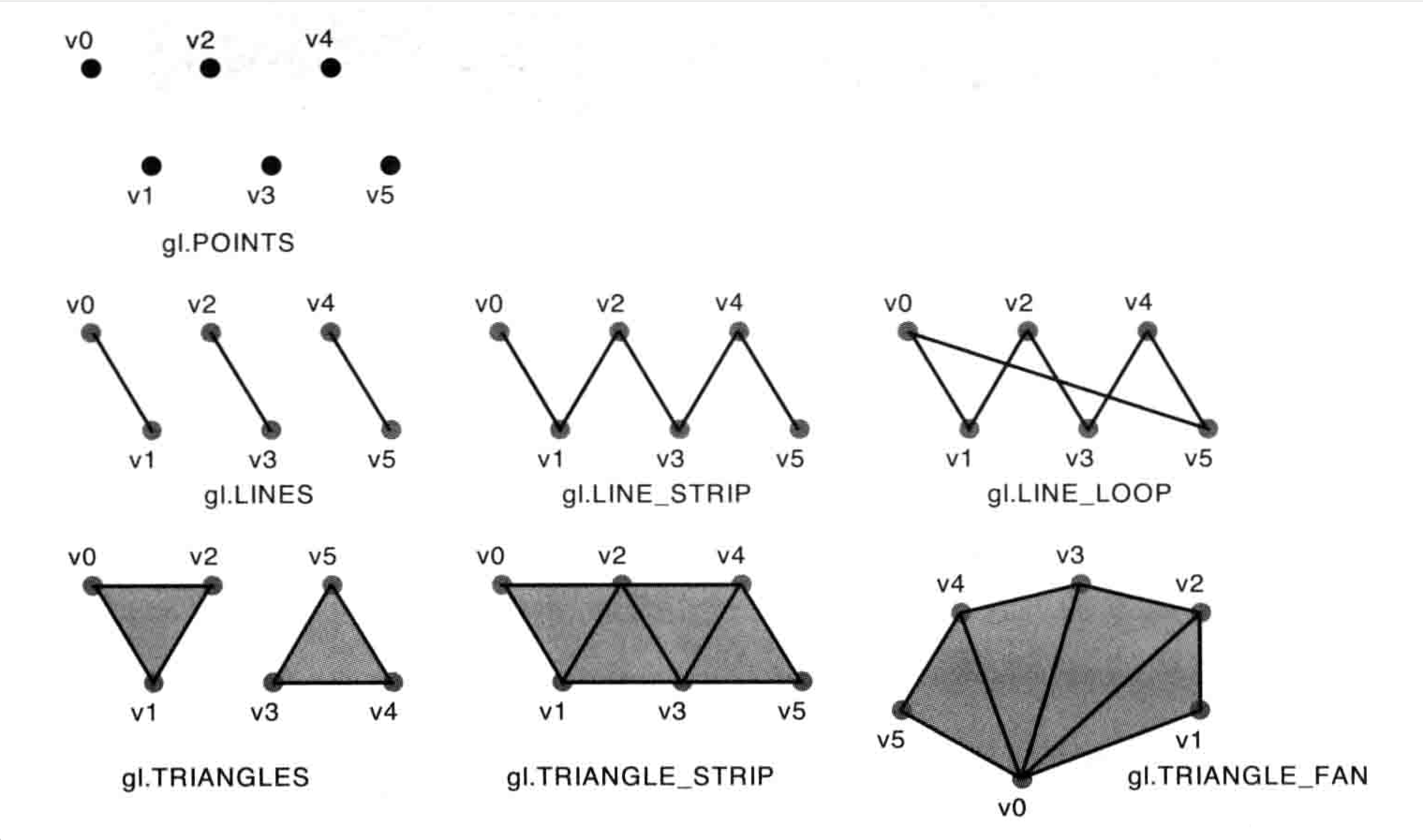
- gl.POINTS: 绘制一系列点
- gl.LINE_STRIP: 绘制一系列线段,上一点连接下一点,首尾顶点不相连
- gl.LINE_LOOP: 绘制一系列线段,上一点连接下一点,首尾顶点相连,形成一个线圈闭环
- gl.LINES:绘制一系列线段,每两个点相连,线段之间不相连
- gl.TRIANGLES: 绘制一多个独立的三角形。每三个点作为顶点。三角形之间不相连
- gl.TRIANGLE_STRIP:绘制相连接的三角形,前三个顶点绘制一个三角形,后续的顶点会以,它前面两个顶点绘制的边,来绘制新的三角形
- gl.TRIANGLE_FAN;绘制一个扇形,以第一个顶点为原心依次绘制三角形
- first:从哪个顶点开始绘制
- 绘制需要多少个顶点
矩阵: 矩阵就是纵横排列的数据表格(m行n列),作用是把一个点转换到另一个点
绘制三角形
绘制三角形会忽略 gl_PointSize(只有绘制点时才生效),
import { useEffect } from "react";
import { initShader } from "./libs/webgl.js"

function App() {
  useEffect(() => {
    const canvas = document.querySelector("#glcanvas");
    const gl = canvas.getContext("webgl2");

    const vertexShaderSource = `
      attribute vec4 aPosition;
      void main() {
        gl_Position = aPosition;
        gl_PointSize = 10.0;
      }
    `;
    const fragmentShaderSource = `
      void main() {
        gl_FragColor = vec4(1.0, 0.0, 0.0, 1.0);
      }
    `;

    const program = initShader(gl, vertexShaderSource, fragmentShaderSource);

    const aPosition = gl.getAttribLocation(program, 'aPosition');

    // 创建缓存区
    const points = new Float32Array([
      -0.5, -0.5,
      0.5, -0.5,
      0.5, 0.5,
      -0.5, 0.5,
      0.8, -0.2
    ]);

    const glBuffer = gl.createBuffer();

    gl.bindBuffer(gl.ARRAY_BUFFER, glBuffer);

    gl.bufferData(gl.ARRAY_BUFFER, points, gl.STATIC_DRAW);

    const BYTES = points.BYTES_PER_ELEMENT;

    gl.vertexAttribPointer(aPosition, 2, gl.FLOAT, false, 0, 0);
    gl.enableVertexAttribArray(aPosition);

    // 8. 绘制图行
    // gl.drawArrays(gl.LINES, 0, 2);
    // gl.drawArrays(gl.LINE_LOOP, 0, 3);
    // gl.drawArrays(gl.LINE_STRIP, 0, 3);
    gl.drawArrays(gl.TRIANGLES, 0, 4); // 顶点必须3的倍数
    // gl.drawArrays(gl.TRIANGLE_STRIP, 0, 3);
    // gl.drawArrays(gl.TRIANGLE_FAN, 0, 5);
  }, []);

  return <canvas id="glcanvas" width="200" height="200" style={{ background: "#FAEAD7" }}></canvas>
}

export default App;
预览
二维平移
偏移量平移
import { useEffect } from "react";
import { initShader } from "./libs/webgl.js"

function App() {
  useEffect(() => {
    const canvas = document.querySelector("#glcanvas");
    const gl = canvas.getContext("webgl2");

    const vertexShaderSource = `
      attribute vec4 aPosition;
      attribute float aTranslate;
      void main() {
        gl_Position = vec4(aPosition.x+aTranslate, aPosition.y+aTranslate, aPosition.z,1.0);
        gl_PointSize = 10.0;
      }
    `;
    const fragmentShaderSource = `
      void main() {
        gl_FragColor = vec4(1.0, 0.0, 0.0, 1.0);
      }
    `;

    const program = initShader(gl, vertexShaderSource, fragmentShaderSource);

    const aPosition = gl.getAttribLocation(program, 'aPosition');
    const aTranslate = gl.getAttribLocation(program, 'aTranslate');

    // 创建缓存区
    const points = new Float32Array([
      -0.5, -0.5,
      0.5, -0.5,
      0.5, 0.5,
    ]);

    const glBuffer = gl.createBuffer();

    gl.bindBuffer(gl.ARRAY_BUFFER, glBuffer);

    gl.bufferData(gl.ARRAY_BUFFER, points, gl.STATIC_DRAW);

    const BYTES = points.BYTES_PER_ELEMENT;

    gl.vertexAttribPointer(aPosition, 2, gl.FLOAT, false, 0, 0);
    gl.enableVertexAttribArray(aPosition);

    let duration = 0;
    const animation = () => {
      duration += 0.01;
      if (duration > 1.5) {
        duration = 0;
      }
      gl.vertexAttrib1f(aTranslate, duration);
      gl.drawArrays(gl.TRIANGLES, 0, 3);
      requestAnimationFrame(animation);
    }
    animation();
  }, []);

  return <canvas id="glcanvas" width="200" height="200" style={{ background: "#FAEAD7" }}></canvas>
}

export default App;
预览
矩阵平移
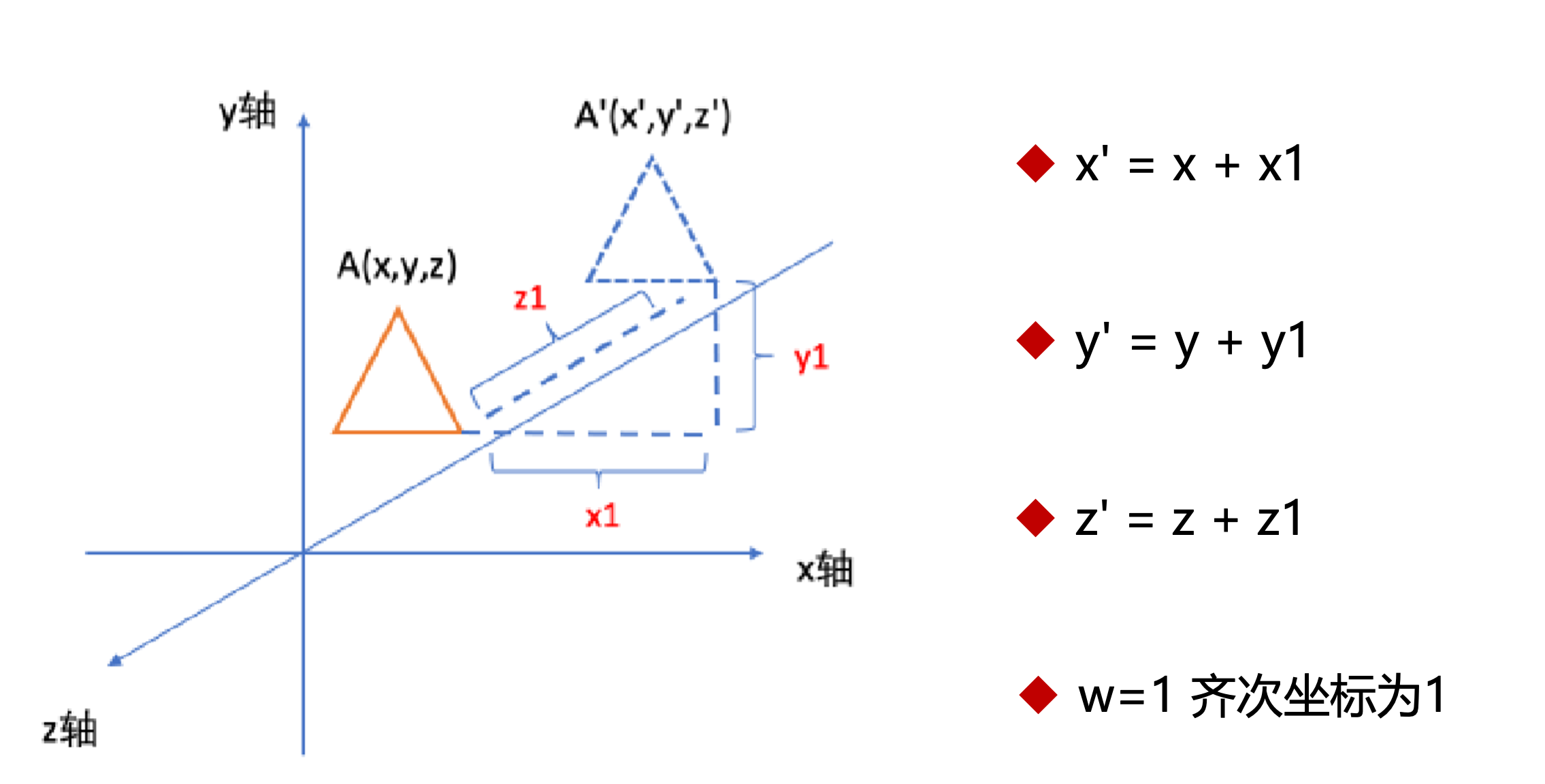
获取平移矩阵,计算平移后的坐标,可以的到下面的公式
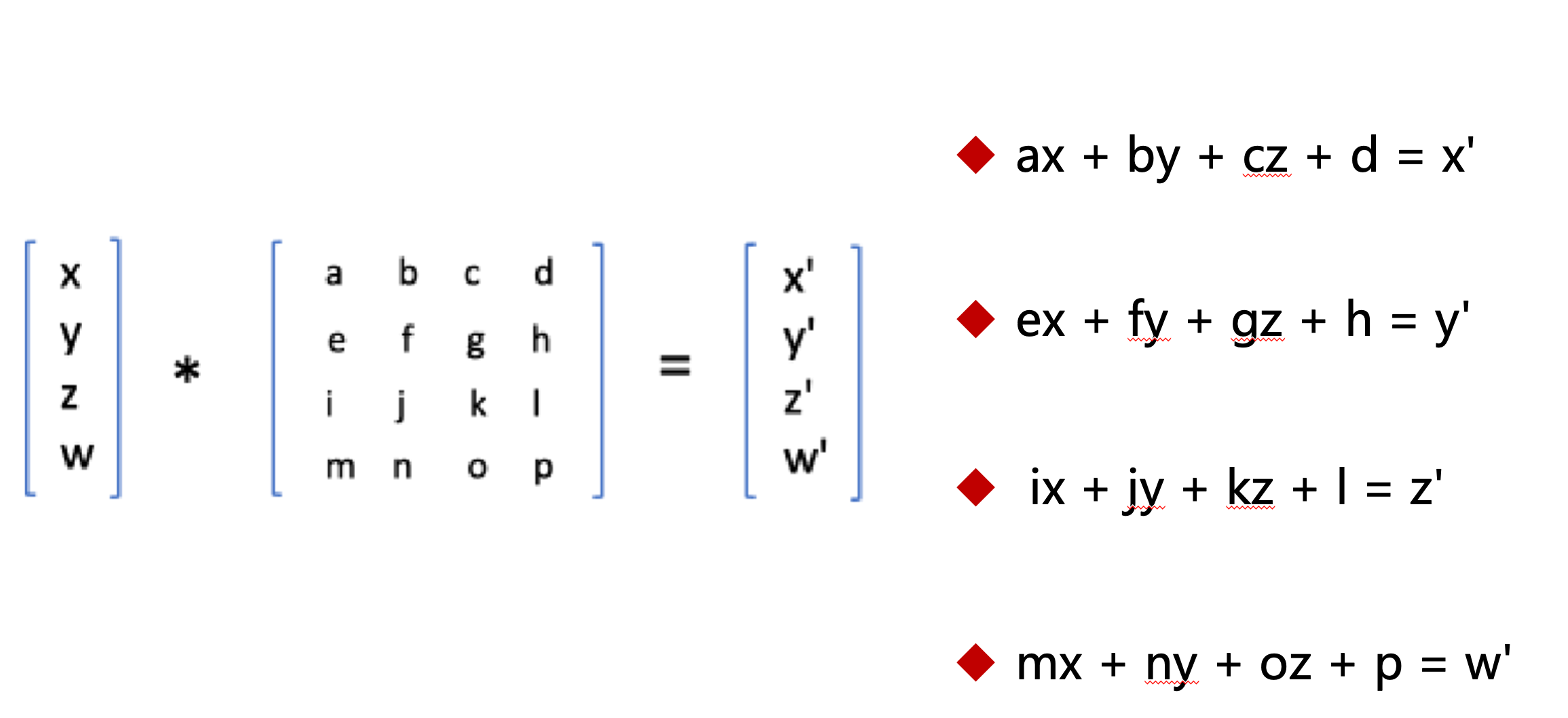
然后计算出矩阵平移的转换矩阵
// x ---> x',要满足等式成立,a=1,b=c=0,d=x1
ax + by + cz + d = x + x1;

// y ---> y',要满足等式成立,e=g=0,f=1,h=y1
ex + fy + gz + h = y + y1;

// z ---> z',要满足等式成立,i=j=0,k=1,l=y1
ix + jy + kz + l = z + z1;

// z ---> z',要满足等式成立,m=n=o=0,p=1
mx + ny + oz + p = 1;

/** 行主序变为列主序

1 0 0 x1              1  0  0  0
0 1 0 y1  ==列主序==>  0  1  0  0
0 0 1 z1              0  0  1  0
0 0 0 1               x1 y1 z1 1

 */
import { useEffect } from "react";
import { initShader } from "./libs/webgl.js"

function App() {
  useEffect(() => {
    const canvas = document.querySelector("#glcanvas");
    const gl = canvas.getContext("webgl2");

    const vertexShaderSource = `
      attribute vec4 aPosition;
      uniform mat4 mat;
      void main() {
        gl_Position = mat * aPosition;
        gl_PointSize = 10.0;
      }
    `;
    const fragmentShaderSource = `
      void main() {
        gl_FragColor = vec4(1.0, 0.0, 0.0, 1.0);
      }
    `;

    const program = initShader(gl, vertexShaderSource, fragmentShaderSource);

    const aPosition = gl.getAttribLocation(program, 'aPosition');
    const mat = gl.getUniformLocation(program, "mat");
    // 创建缓存区
    const points = new Float32Array([
      -0.5, -0.5,
      0.5, -0.5,
      0.5, 0.5,
    ]);

    function getTranslateMatrix(x = 0, y = 0, z = 0) {
      return new Float32Array([
        1.0, 0.0, 0.0, 0.0,
        0.0, 1.0, 0.0, 0.0,
        0.0, 0.0, 1.0, 0.0,
        x  ,  y  , z  , 1,
      ])
    }

    const glBuffer = gl.createBuffer();

    gl.bindBuffer(gl.ARRAY_BUFFER, glBuffer);

    gl.bufferData(gl.ARRAY_BUFFER, points, gl.STATIC_DRAW);

    const BYTES = points.BYTES_PER_ELEMENT;

    gl.vertexAttribPointer(aPosition, 2, gl.FLOAT, false, 0, 0);
    gl.enableVertexAttribArray(aPosition);

    let duration = -1;
    const animation = () => {
      duration += 0.01;
      if (duration > 1.5) {
        duration = -1;
      }
      const matrix = getTranslateMatrix(duration);
      gl.uniformMatrix4fv(mat, false, matrix);
      gl.drawArrays(gl.TRIANGLES, 0, 3);

      requestAnimationFrame(animation);
    }
    animation();
  }, []);

  return <canvas id="glcanvas" width="200" height="200" style={{ background: "#FAEAD7" }}></canvas>
}

export default App;
预览
二维缩放
偏移缩放
import { useEffect } from "react";
import { initShader } from "./libs/webgl.js"

function App() {
  useEffect(() => {
    const canvas = document.querySelector("#glcanvas");
    const gl = canvas.getContext("webgl2");

    const vertexShaderSource = `
      attribute vec4 aPosition;
      attribute float aTranslate;
      void main() {
        gl_Position = vec4(aPosition.x*aTranslate, aPosition.y*aTranslate, aPosition.z,1.0);
        gl_PointSize = 10.0;
      }
    `;
    const fragmentShaderSource = `
      void main() {
        gl_FragColor = vec4(1.0, 0.0, 0.0, 1.0);
      }
    `;

    const program = initShader(gl, vertexShaderSource, fragmentShaderSource);

    const aPosition = gl.getAttribLocation(program, 'aPosition');
    const aTranslate = gl.getAttribLocation(program, 'aTranslate');

    // 创建缓存区
    const points = new Float32Array([
      -0.5, -0.5,
      0.5, -0.5,
      0, 0.5,
    ]);

    const glBuffer = gl.createBuffer();

    gl.bindBuffer(gl.ARRAY_BUFFER, glBuffer);

    gl.bufferData(gl.ARRAY_BUFFER, points, gl.STATIC_DRAW);

    const BYTES = points.BYTES_PER_ELEMENT;

    gl.vertexAttribPointer(aPosition, 2, gl.FLOAT, false, 0, 0);
    gl.enableVertexAttribArray(aPosition);

    let duration = 0;
    const animation = () => {
      duration += 0.01;
      if (duration > 2) {
        duration = 0;
      }
      gl.vertexAttrib1f(aTranslate, duration);
      gl.drawArrays(gl.TRIANGLES, 0, 3);
      requestAnimationFrame(animation);
    }
    animation();
  }, []);

  return <canvas id="glcanvas" width="200" height="200" style={{ background: "#FAEAD7" }}></canvas>
}

export default App;
预览
矩阵缩放
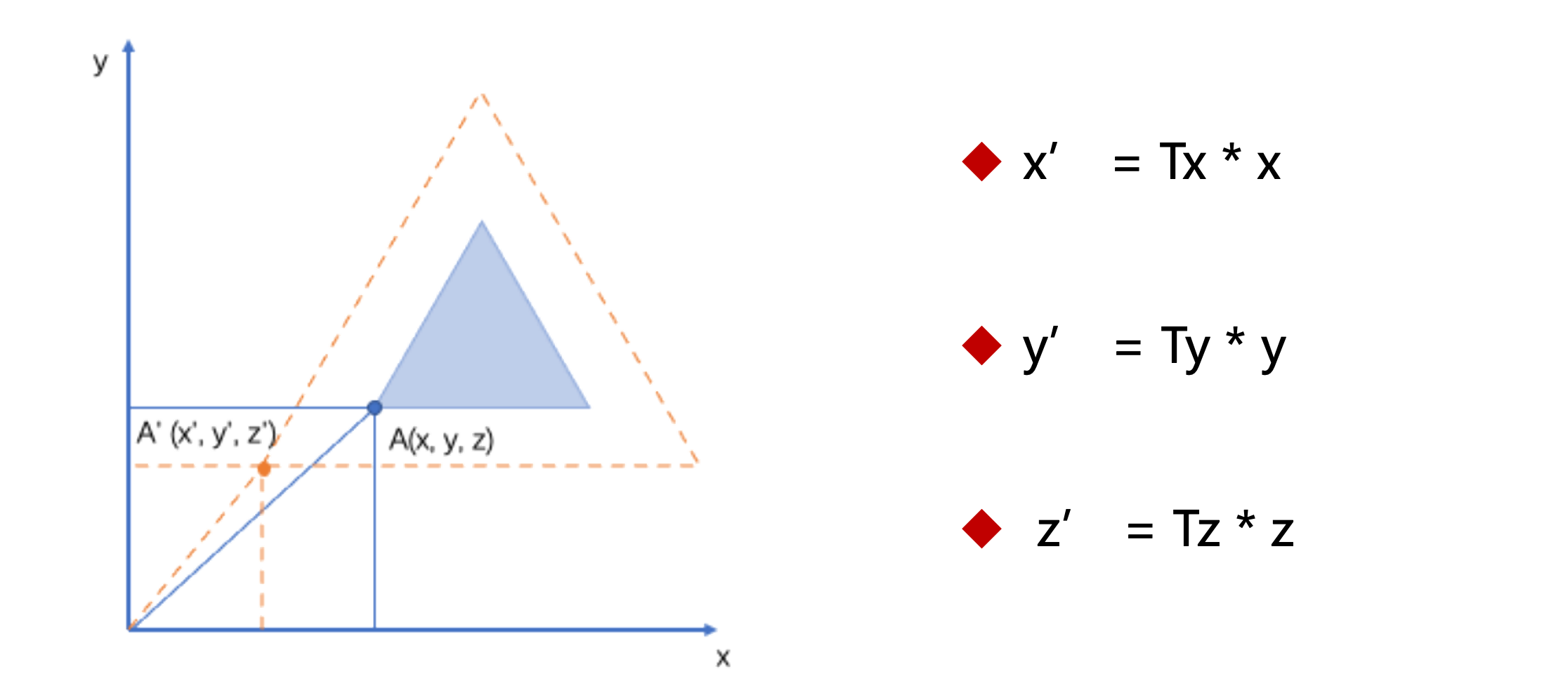
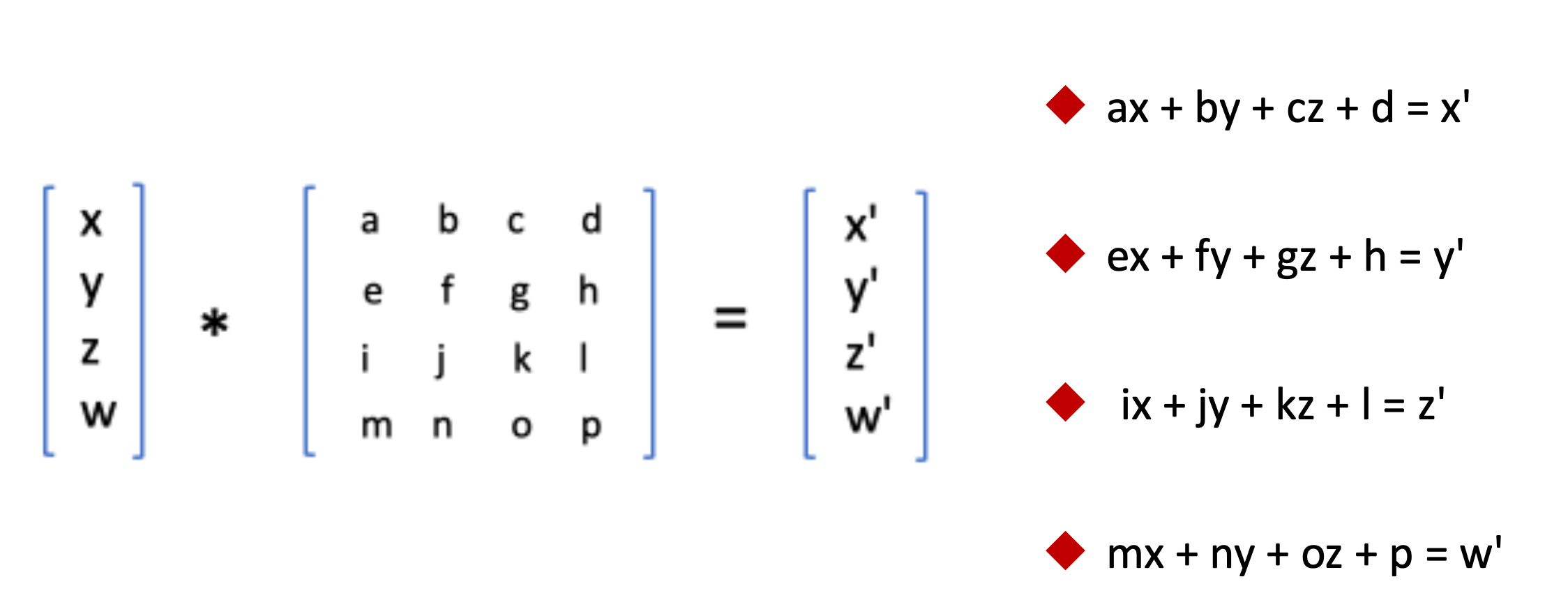
// x ---> x',要满足等式成立,a=Tx,b=c=d=0
ax + by + cz + d = Tx * x;

// y ---> y',要满足等式成立,e=g=h=0,f=Ty
ex + fy + gz + h = Ty * y;

// z ---> z',要满足等式成立,i=j=l=0,k=Tz
ix + jy + kz + l = Tz * z;

// z ---> z',要满足等式成立,m=n=o=0,p=1
mx + ny + oz + p = 1;

/** 得到目标矩阵

Tx 0  0  0
0  Ty 0  0
0  0  Tz 0
0  0  0  1

 */
import { useEffect } from "react";
import { initShader } from "./libs/webgl.js"

function App() {
  useEffect(() => {
    const canvas = document.querySelector("#glcanvas");
    const gl = canvas.getContext("webgl2");

    const vertexShaderSource = `
      attribute vec4 aPosition;
      uniform mat4 mat;
      void main() {
        gl_Position = mat * aPosition;
        gl_PointSize = 10.0;
      }
    `;
    const fragmentShaderSource = `
      void main() {
        gl_FragColor = vec4(1.0, 0.0, 0.0, 1.0);
      }
    `;

    const program = initShader(gl, vertexShaderSource, fragmentShaderSource);

    const aPosition = gl.getAttribLocation(program, 'aPosition');
    const mat = gl.getUniformLocation(program, "mat");
    // 创建缓存区
    const points = new Float32Array([
      -0.5, -0.5,
      0.5, -0.5,
      0.0, 0.5,
    ]);

    function getScaleMatrix(x = 1, y = 1, z = 1) {
      return new Float32Array([
        x,   0.0, 0.0, 0.0,
        0.0, y,   0.0, 0.0,
        0.0, 0.0, z,   0.0,
        0.0, 0.0, 0.0, 1.0,
      ])
    }

    const glBuffer = gl.createBuffer();

    gl.bindBuffer(gl.ARRAY_BUFFER, glBuffer);

    gl.bufferData(gl.ARRAY_BUFFER, points, gl.STATIC_DRAW);

    const BYTES = points.BYTES_PER_ELEMENT;

    gl.vertexAttribPointer(aPosition, 2, gl.FLOAT, false, 0, 0);
    gl.enableVertexAttribArray(aPosition);

    let duration = 0;
    const animation = () => {
      duration += 0.01;
      if (duration > 2) {
        duration = 0;
      }
      const matrix = getScaleMatrix(duration, duration);
      gl.uniformMatrix4fv(mat, false, matrix);
      gl.drawArrays(gl.TRIANGLES, 0, 3);

      requestAnimationFrame(animation);
    }
    animation();
  }, []);

  return <canvas id="glcanvas" width="200" height="200" style={{ background: "#FAEAD7" }}></canvas>
}

export default App;
预览
二维旋转
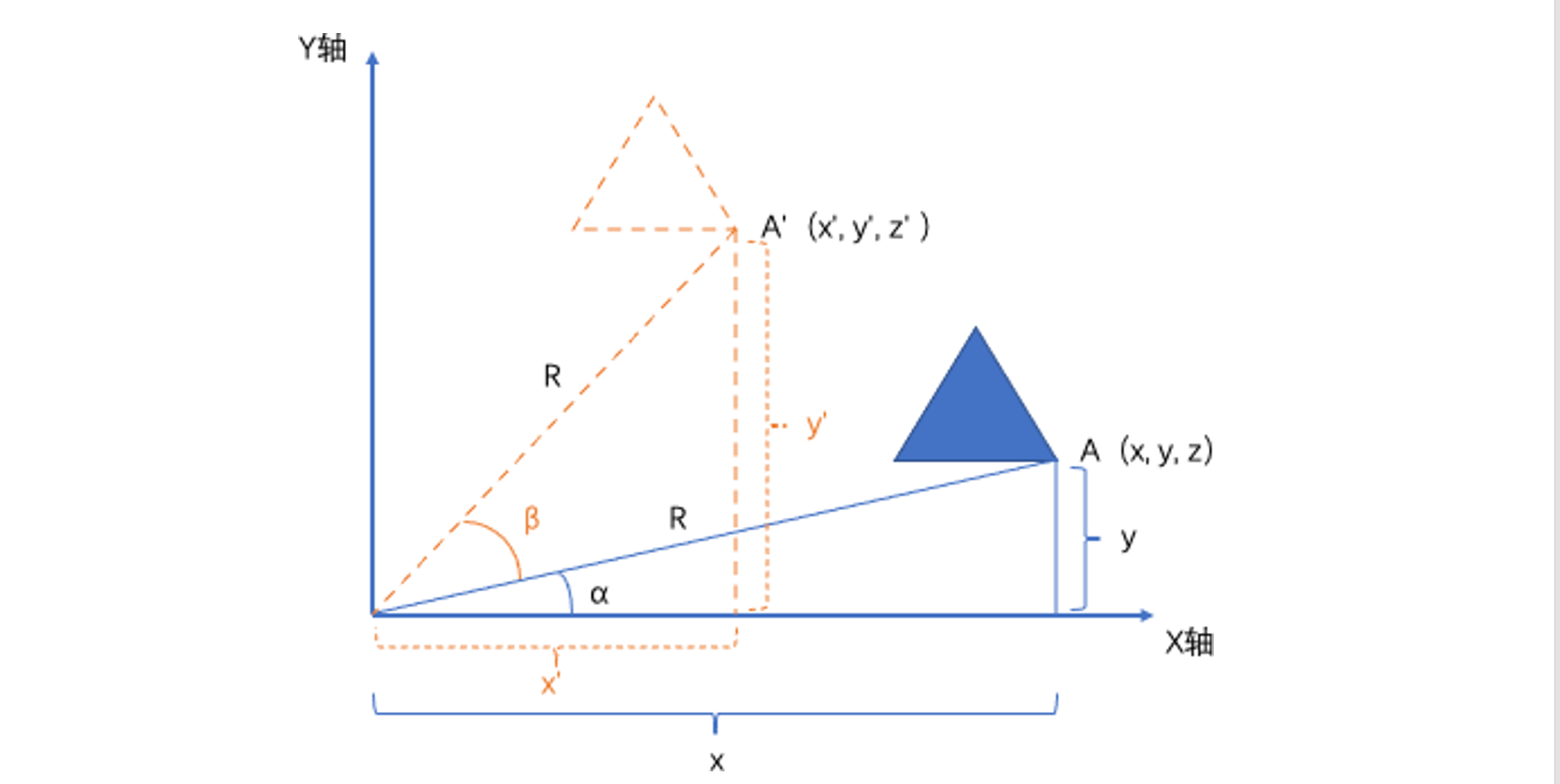
图形初始化 A 顶点位置计算公式
x = cos(α) * R;
y = sin(α) * R;
z = 0;
图形旋转 β 角度后到达 A',A' 顶点的计算公式
x' = cos(α+β) * R
   = R(cos(α)*cos(β) - sin(α)*sin(β))
   = x*cos(β) - y*sin(β)

y' = sin(α+β) * R
   = R(sin(α)*cos(β) + cos(α)*sin(β))
   = y*cos(β) + x*sin(β)

z' = z;
有了 A' 的计算方式,下面就可以使用代码让图形旋转
偏移旋转
import { useEffect } from "react";
import { initShader } from "./libs/webgl.js"

function App() {
  useEffect(() => {
    const canvas = document.querySelector("#glcanvas");
    const gl = canvas.getContext("webgl2");

    const vertexShaderSource = `
      attribute vec4 aPosition;
      attribute float deg;
      void main() {
        gl_Position.x = aPosition.x * cos(deg) - aPosition.y * sin(deg);
        gl_Position.y = aPosition.y * cos(deg) + aPosition.x * sin(deg);
        gl_Position.z = aPosition.z;
        gl_Position.w = aPosition.w;
        gl_PointSize = 10.0;
      }
    `;
    const fragmentShaderSource = `
      void main() {
        gl_FragColor = vec4(1.0, 0.0, 0.0, 1.0);
      }
    `;

    const program = initShader(gl, vertexShaderSource, fragmentShaderSource);

    const aPosition = gl.getAttribLocation(program, 'aPosition');
    const deg = gl.getAttribLocation(program, 'deg');

    // 创建缓存区
    const points = new Float32Array([
      -0.5, -0.5,
      0.5, -0.5,
      0.0, 0.5,
    ]);

    const glBuffer = gl.createBuffer();

    gl.bindBuffer(gl.ARRAY_BUFFER, glBuffer);

    gl.bufferData(gl.ARRAY_BUFFER, points, gl.STATIC_DRAW);

    const BYTES = points.BYTES_PER_ELEMENT;

    gl.vertexAttribPointer(aPosition, 2, gl.FLOAT, false, 0, 0);
    gl.enableVertexAttribArray(aPosition);

    let duration = 1;
    const animation = () => {
      duration += 0.01;
      gl.vertexAttrib1f(deg, duration);
      gl.drawArrays(gl.TRIANGLES, 0, 3);
      requestAnimationFrame(animation);
    }
    animation();
  }, []);

  return <canvas id="glcanvas" width="200" height="200" style={{ background: "#FAEAD7" }}></canvas>
}

export default App;
预览
矩阵旋转
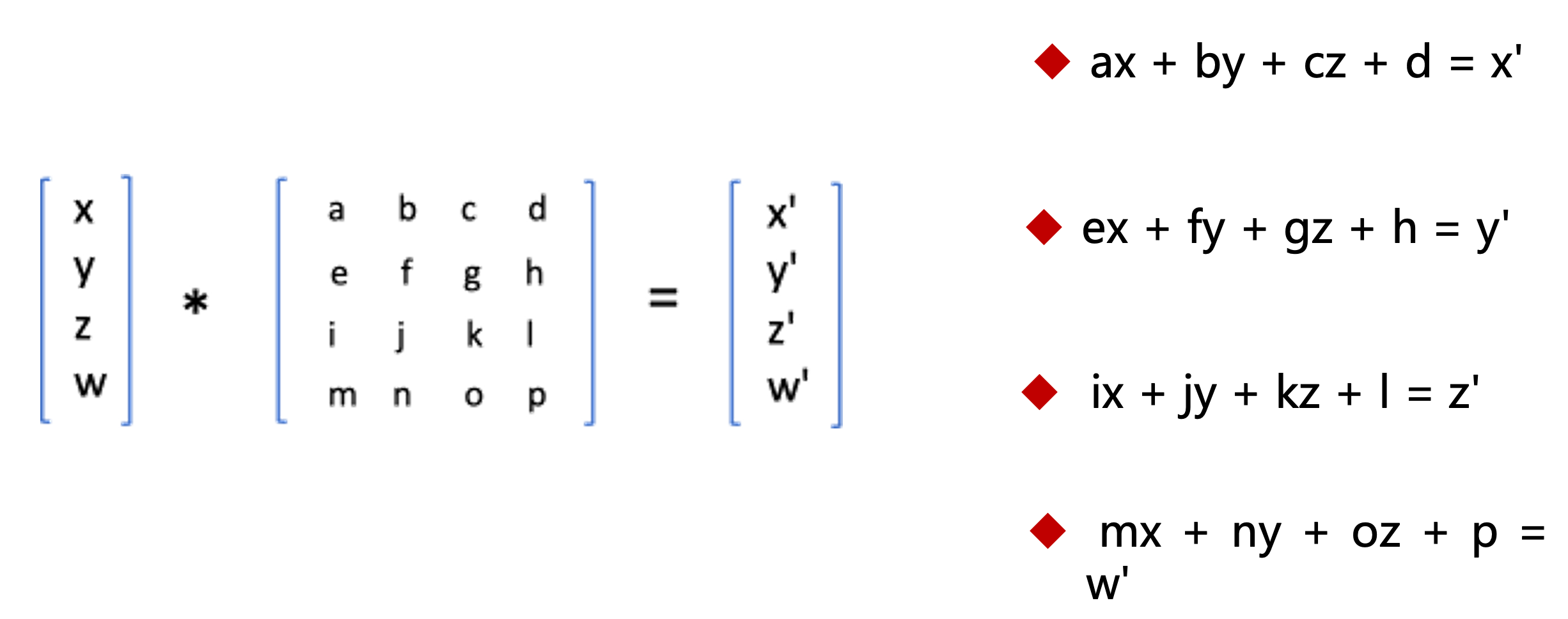
// x ---> x',要满足等式成立,a=cos(β), b=-sin(β), c=d=0
ax + by + cz + d = x * cos(β) - y * sin(β);

// y ---> y',要满足等式成立,e=sin(β), f=cos(β), g=h=0
ex + fy + gz + h = x.sin(β) + y.cos(β);

// z ---> z',要满足等式成立,i=j=l=0,k=1
ix + jy + kz + l = z;

// z ---> z',要满足等式成立,m=n=o=0,p=1
mx + ny + oz + p = 1;

/** 得到目标矩阵变为列矩阵

cos(β)  -sin(β) 0  0                       cos(β)  sin(β)   0  0
sin(β)  cos(β)  0  0     ==转为列矩阵==>     -sin(β)  cos(β)  0  0
0       0       1  0                       0       0        1  0
0       0       0  1                       0       0        0  1

 */
更改的代码如下
import { useEffect } from "react";
import { initShader } from "./libs/webgl.js"

function App() {
  useEffect(() => {
    const canvas = document.querySelector("#glcanvas");
    const gl = canvas.getContext("webgl2");

    const vertexShaderSource = `
      attribute vec4 aPosition;
      uniform mat4 mat;
      void main() {
        gl_Position = aPosition * mat;
        gl_PointSize = 10.0;
      }
    `;
    const fragmentShaderSource = `
      void main() {
        gl_FragColor = vec4(1.0, 0.0, 0.0, 1.0);
      }
    `;

    const program = initShader(gl, vertexShaderSource, fragmentShaderSource);

    const aPosition = gl.getAttribLocation(program, 'aPosition');
    const mat = gl.getUniformLocation(program, "mat");
    // 创建缓存区
    const points = new Float32Array([
      -0.5, -0.5,
      0.5, -0.5,
      0.0, 0.5,
    ]);

    function getRotateMatrix(deg = 0) {
      const { cos, sin } = Math;
      return new Float32Array([
        cos(deg),  sin(deg),   0.0,  0.0,
        -sin(deg), cos(deg),   0.0,  0.0,
        0.0,       0.0,        1.0,  0.0,
        0.0,       0.0,        0.0,  1.0,
      ])
    }

    const glBuffer = gl.createBuffer();

    gl.bindBuffer(gl.ARRAY_BUFFER, glBuffer);

    gl.bufferData(gl.ARRAY_BUFFER, points, gl.STATIC_DRAW);

    const BYTES = points.BYTES_PER_ELEMENT;

    gl.vertexAttribPointer(aPosition, 2, gl.FLOAT, false, 0, 0);
    gl.enableVertexAttribArray(aPosition);

    let duration = 0;
    const animation = () => {
      duration += 0.01;
      const matrix = getRotateMatrix(duration);
      gl.uniformMatrix4fv(mat, false, matrix);
      gl.drawArrays(gl.TRIANGLES, 0, 3);

      requestAnimationFrame(animation);
    }
    animation();
  }, []);

  return <canvas id="glcanvas" width="200" height="200" style={{ background: "#FAEAD7" }}></canvas>
}

export default App;
预览
矩阵函数
// 平移矩阵
function getTranslateMatrix(x = 0, y = 0, z = 0) {
  return new Float32Array([
    1.0, 0.0, 0.0, 0.0,
    0.0, 1.0, 0.0, 0.0,
    0.0, 0.0, 1.0, 0.0,
    x  ,  y  , z  , 1,
  ])
}

// 缩放矩阵
function getScaleMatrix(x = 1, y = 1, z = 1) {
  return new Float32Array([
    x,   0.0, 0.0, 0.0,
    0.0, y,   0.0, 0.0,
    0.0, 0.0, z,   0.0,
    0.0, 0.0, 0.0, 1.0,
  ])
}

// 旋转矩阵
function getRotateMatrix(deg = 0) {
  const { cos, sin } = Math;
  return new Float32Array([
    cos(deg),  sin(deg),   0.0,  0.0,
    -sin(deg), cos(deg),   0.0,  0.0,
    0.0,       0.0,        1.0,  0.0,
    0.0,       0.0,        0.0,  1.0,
  ])
}
复合变换
多矩阵
import { useEffect } from "react";
import { initShader, getTranslateMatrix, getScaleMatrix, getRotateMatrix } from "./libs/webgl.js"

function App() {
  useEffect(() => {
    const canvas = document.querySelector("#glcanvas");
    const gl = canvas.getContext("webgl2");

    const vertexShaderSource = `
      attribute vec4 aPosition;
      uniform mat4 translateMatrix;
      uniform mat4 scaleMatrix;
      uniform mat4 rotateMatrix;
      void main() {
        gl_Position = translateMatrix * scaleMatrix * rotateMatrix * aPosition;
        gl_PointSize = 10.0;
      }
    `;
    const fragmentShaderSource = `
      void main() {
        gl_FragColor = vec4(1.0, 0.0, 0.0, 1.0);
      }
    `;

    const program = initShader(gl, vertexShaderSource, fragmentShaderSource);

    const aPosition = gl.getAttribLocation(program, 'aPosition');
    const translateMatrix = gl.getUniformLocation(program, "translateMatrix");
    const scaleMatrix = gl.getUniformLocation(program, "scaleMatrix");
    const rotateMatrix = gl.getUniformLocation(program, "rotateMatrix");
    // 创建缓存区
    const points = new Float32Array([
      -0.5, -0.5,
      0.5, -0.5,
      0.0, 0.5,
    ]);

    const glBuffer = gl.createBuffer();

    gl.bindBuffer(gl.ARRAY_BUFFER, glBuffer);

    gl.bufferData(gl.ARRAY_BUFFER, points, gl.STATIC_DRAW);

    const BYTES = points.BYTES_PER_ELEMENT;

    gl.vertexAttribPointer(aPosition, 2, gl.FLOAT, false, 0, 0);
    gl.enableVertexAttribArray(aPosition);

    let translateX = -1;
    let scaleX = 0.1;
    let degX = 0;
    const animation = () => {
      translateX += 0.01;
      scaleX += 0.01;
      degX += 0.01;

      if(translateX > 2) {
        translateX = -1;
      }

      if(scaleX > 1.5) {
        scaleX = 0.1;
      }

      const translate = getTranslateMatrix(translateX);
      const scale = getScaleMatrix(scaleX);
      const rotate = getRotateMatrix(degX);
      gl.uniformMatrix4fv(translateMatrix, false, translate);
      gl.uniformMatrix4fv(scaleMatrix, false, scale);
      gl.uniformMatrix4fv(rotateMatrix, false, rotate);

      gl.drawArrays(gl.TRIANGLES, 0, 3);
      requestAnimationFrame(animation);
    }
    animation();
  }, []);

  return <canvas id="glcanvas" width="200" height="200" style={{ background: "#FAEAD7" }}></canvas>
}

export default App;
预览
矩阵复合动画
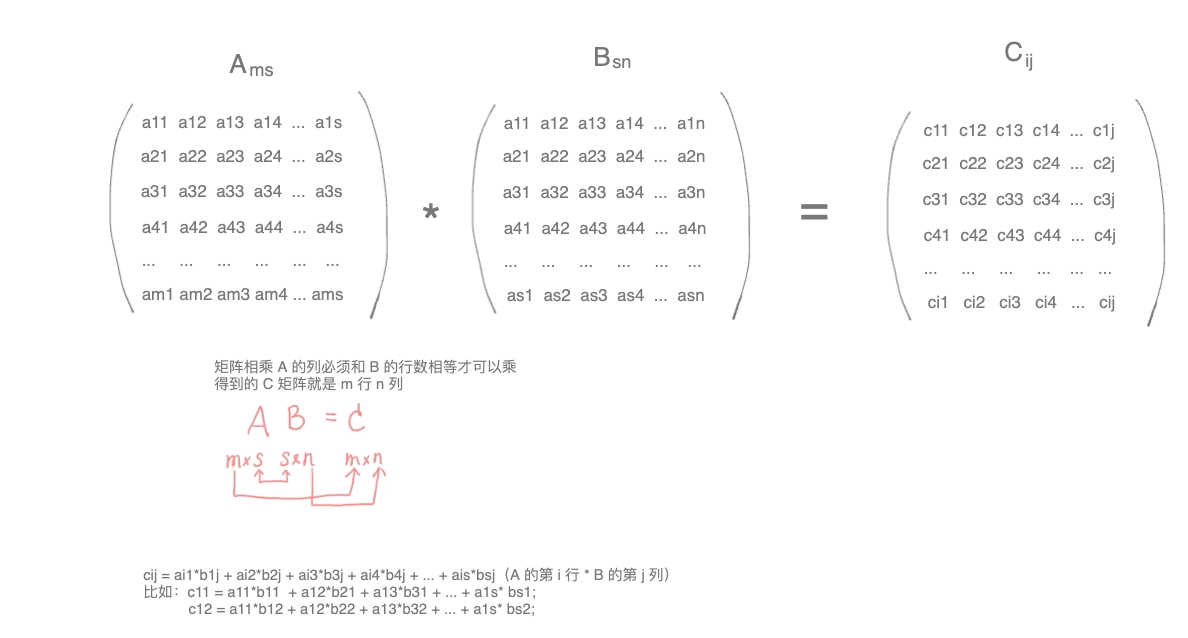
比如有 A 矩阵、B 矩阵,相乘得 C 矩阵,想要计算 cij,需要用 A 的第 i 行乘以 B 的第 j 列
多个矩阵的计算也遵循乘法的运算律
- 结合律:
(AB)C = A(BC) - 分配律:
(A + B)C = AC + BC t(AB) = (tA)B = A(tB)
需要注意的是:矩阵运算不遵循交换律, 一般情况下AB≠BA
矩阵乘法函数
function mixMatrix(A, B) {
  const C = new
}