AOP
AOP(面向切面编程),传统的 MVC 框架,当我们想在请求处理前,做一些通用逻辑的处理,这时就需要侵入 Controller 层的代码,不管是开发还是维护都非常痛苦的,业务代码变得冗余臃肿。而 Nestjs 通过 AOP 能把一些通用逻辑抽离出去,通过装饰器的方式注册到 Controller 中,这样就更容易维护了,业务代码也就变得更纯粹了。
Nestjs 常用的有这几种:
- MiddleWare:和 Express 中间件一样的洋葱模型,会在请求前后执行,这个就是为了兼容 Express 的中间件的
- Guard:路由守卫,在访问 Controller 前做一些权限判断,返回 true 或 false
- Pipe:对参数做一些校验
- Interceptor:拦截器,会在请求处理前后执行一些逻辑
- ExceptionFilter:对应用的错误进行拦截,并返回错误信息
调用顺序
- 首先调用 MiddleWare,到达某个路由
- 调用 Guard,判断有没有访问路由的权限
- 调用 Interceptor 对 Controller 做一些扩展逻辑的处理
- 调用 Pipe 对参数进行校验
- 调用 Controller handle
- 如果整个请求处理周期出现做错,会被 ExceptionFilter 拦截并响应错误信息
MiddleWare
这个是 Express 中的概念,Nestjs 是 Express 实现的,自然支持,但在开发中用的比较少,语义不强
中间件分为全局中间件和路由中间件
全局中间件
Nestjs 并没有提供全局中间件的 useGlobalXxx 方式,所以可以使用 app.use 来在 main 程序入口注册
app.use((req, res, next) => {
  console.log('全局中间件 before');
  next();
  console.log('全局中间件 after');
});
路由中间件
使用命令生成一个 log 中间件
$ nest g middleware middlewares/log --no-spec
必须在 app.module.ts 中注册,配置哪些路由可使用
export class AppModule implements NestModule {
  configure(consumer: MiddlewareConsumer) {
    consumer.apply(LogMiddleware).forRoutes('user');
  }
}
访问 /user/aaa,输出结果
全局中间件 before
路由中间件 before /aaa
handler
路由中间件 after
全局中间件 after
Guard
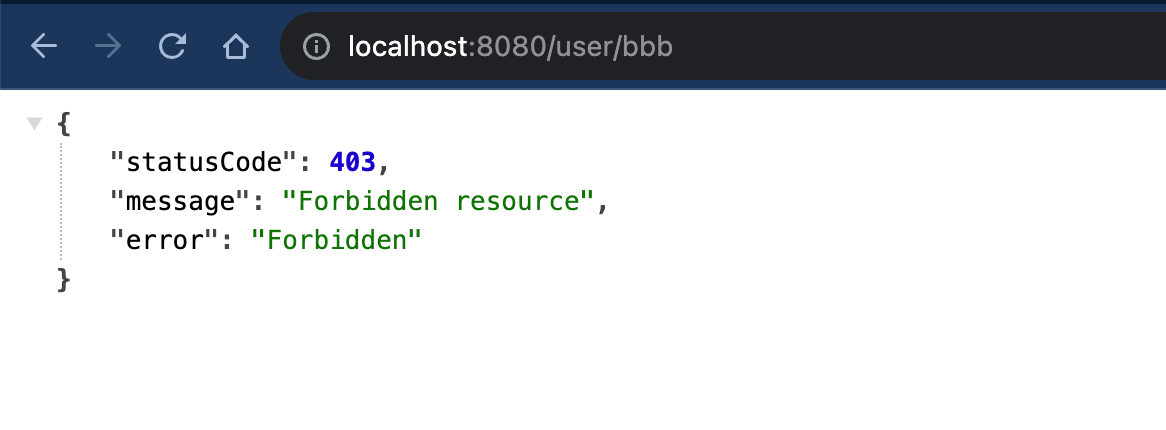
到达路由时,Guard 会判断有没有权限访问,返回 true 放行,返回 false 响应客户端 403
Guard 也分为全局 Guard 和路由级Guard
$ nest g guard guards/role --no-spec
import { CanActivate, ExecutionContext, Injectable } from '@nestjs/common';
import { Observable } from 'rxjs';

@Injectable()
export class RoleGuard implements CanActivate {
  canActivate(
    context: ExecutionContext,
  ): boolean | Promise<boolean> | Observable<boolean> {
    const req = context.switchToHttp().getRequest<Request>();
    console.log('guard');
    if (req.url === '/user/bbb') {
      return false;
    }
    return true;
  }
}
路由 Guard
使用 UseGuards 装饰器
@Controller('user')
export class UserController {
  constructor(private readonly userService: UserService) {}

  @Get('/aaa')
  @UseGuards(RoleGuard)
  findAll() {
    console.log('handler');
    return this.userService.findAll();
  }

  @Get('/bbb')
  @UseGuards(RoleGuard)
  findOne(@Param('id') id: string) {
    console.log('handler');
    return this.userService.findOne(+id);
  }
}
输出结果
- 访问
/user/aaa
guard
handler
- 访问
/user/bbb
guard
响应 403
全局使用
nestjs 提供了两种注册全局 Guard 的方式,区别在于是否可以使用 IOC 容器内的 provider
- 是在 IOC 容器内注册,优势是可以使用 IOC 容器内的
Provider,比如在 Guard 内可以注入使用AppService
import { RolesGuard } from './guard/role-guard';

@Module({
  imports: [],
  controllers: [AppController],
  providers: [
    AppService,
    {
      provide: APP_GUARD,
      useClass: RolesGuard,
    },
  ],
})
export class AppModule implements NestModule {
}
- 全局 use
import { RoleGuard } from './guard/role.guard';

async function bootstrap() {
  const app = await NestFactory.create<NestExpressApplication>(AppModule);

  app.useGlobalGuards(new RoleGuard());

  await app.listen(8080);
}
bootstrap();
Interceptor
拦截器,目的实在 COntroller 前后执行一些逻辑
$ nest g interceptor interceptors/test --no-spec
@Injectable()
export class RequestInterceptor implements NestInterceptor {
  intercept(
    context: ExecutionContext,
    next: CallHandler<any>,
  ): Observable<any> {
    const req = context.switchToHttp().getRequest<Request>();
    console.log('interceptor before');
    return next.handle().pipe(
      tap((data) => {
        console.log('interceptor after', req.url, data);
        return 'o';
      }),
      catchError((error) => {
        console.log('qwewq', error);
        return [error];
      }),
    );
  }
}
全局使用方式、区别和 Guard 类似,也分为两种
- 在 main.ts 使用
useGlobalInterceptors - 在 app.module.ts 使用
APP_INTERCEPTOR
Pipe
执行 Controller 前,对请求参数进行校验和转换
$ nest g pipe pipes/verify-value --no-spec
后端拿到 query 的数据,每个属性值其实都是一个字符串,这时我们可以用 pipe 将属性值转换为我们想要的数据类型
import { ArgumentMetadata, Injectable, PipeTransform } from '@nestjs/common';

@Injectable()
export class VerifyValuePipe implements PipeTransform {
  transform(values: any, metadata: ArgumentMetadata) {
    // data 有值,证明取得是某一个属性,data 为属性 key
    const { type, data } = metadata;
    if (type === 'query') {
      if (!data) {
        Object.entries(values).forEach(([key, value]) => {
          if (value === 'true') {
            values[key] = true;
          } else if (value === 'false') {
            values[key] = false;
          } else if (!Number.isNaN(Number(value))) {
            values[key] = Number(value);
          }
        });
      }
      if(data === 'a') {
        values = Number(value)
      }
    }
    return values;
  }
}
路由使用
如果 findAll 方法有多个参数时,会多次调用 VerifyValuePipe 对每个参数做校验
@Get('/aaa')
@UseGuards(RoleGuard)
@UsePipes(VerifyValuePipe)
findAll(@Query() query: any) {
  console.log('handler', query);
  return this.userService.findAll();
}
也可以对某一个参数做 pipe
@Get('/aaa')
@UseGuards(RoleGuard)
findAll(@Query("a", VerifyValuePipe) a: number) {
  console.log('handler', a);
  return this.userService.findAll();
}
全局注册
和 Guard、Interceptor 类似
- 在 main.ts 使用
useGlobalPipes - 在 app.module.ts 使用 `APP_PIPE
ExceptionFilter
ExceptionFilter 会捕捉到应用程序抛出的异常,Nestjs 提供了一些内置的 ExceptionFilter,比如前面的 Guard 返回 403,返回错误信息是被 ForbiddenException 处理过的
内置的 Exception 都是 HttpException 的子类,HttpException 是继承 Error 对象的,
$ nest g filter filters/test --no-spec
import {
  ArgumentsHost,
  BadRequestException,
  Catch,
  ExceptionFilter,
} from '@nestjs/common';
import { Response } from 'express';

@Catch(BadRequestException)
export class TestFilter implements ExceptionFilter {
  catch(exception: BadRequestException, host: ArgumentsHost) {
    const response: Response = host.switchToHttp().getResponse<Response>();

    response.status(400).json({
      statusCode: 400,
      message: 'test: ' + exception.message,
    });
  }
}
使用方式和 Guard、Interceptor 类似
注意的点
MiddleWare 尽量不要与 Guard、Interceptor 一同使用,可以看一下一起使用有什么问题
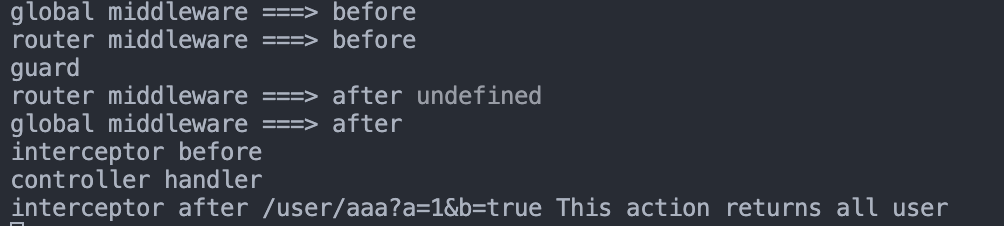
MiddleWare 的后置逻辑会在 Guard 执行后在执行,而我们期望的应该是在 Interceptor 执行后执行
如果不用 Guard,就会是这样
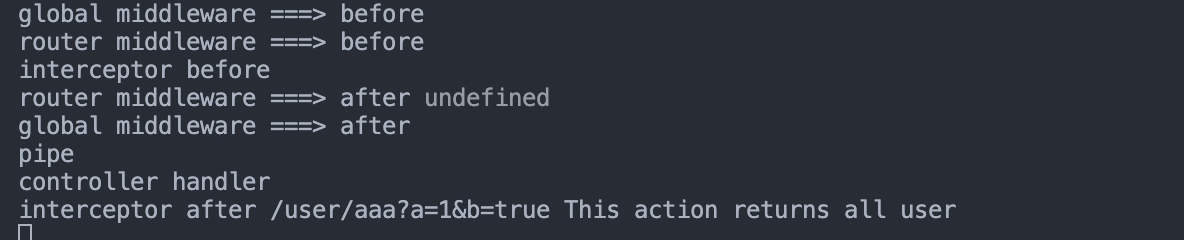
所以在 Nestjs 尽量不要使用 MiddleWare;如果非要使用的话,就不要写后置逻辑,或者不用 Guard、Interceptor,只使用 MiddleWare